Register/Login
Workflow
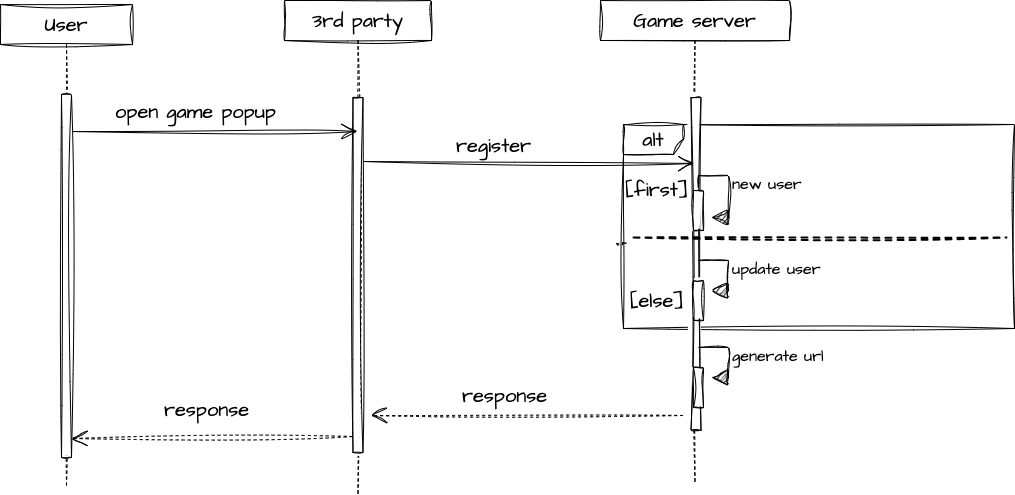
- Users login to the Third Party Portal, the Third Party Portal handles authorization on its own
- To play the game, users open the game popup
- The Third Party Portal will send Register to the game in Eagles a. If it is the first time user play this game, we will create new user in the system for this game, otherwise user will be updated data
- The Eagles Team responses with a redirectUrl which The Third Party Portal can use in a iframe
API
- Description
- Register function is used to get a signature token for player who logins/registers Eagles system
- The token is considered as one time password for this login or register session and it will be expired in 20 seconds.
- You will get URL from this function,then move on to next function to complete the url. Player is required to carry this token to visit our website in order for authentication https://{eagles-system-domain}?signature-token={token}
- Headers
X-Company-KeyX-Server-ID
- URL
| Path | Method |
|---|---|
/auth/register | POST |
- Request
| Parameter | Type | Description *as Required |
|---|---|---|
| username* | string | Should be a unique player name (Number, Letter, and _ only). (must be 6 to 20 characters) |
| display_name* | string | The name that will be displayed in this game, must be 4 to 20 characters |
| avatar | string | The URL contains an image that will be displayed in this game |
| frame | string | The URL contains an image that will be displayed in this game |
- Response
| Parameter | Type | Description |
|---|---|---|
| url | string | Url contains a token that the Third Party Portal can use in an iframe to visit our website for authentication. |
- Example
| Name | Sample |
|---|---|
| Request | {"username": "player-01", "display_name": "hi i am tony", "avatar": "https://example.com/avatar.png","frame": "https://example.com/frame.png"} |
| Response | {"url": "https://exmaple.com?signature-token=token123"} |